Business can request for scrutiny of orders coming from specific system into Oracle Order Management. It can even request for extra pair of eyes for “High Value transactions” and request for Order Approval process to be in place.
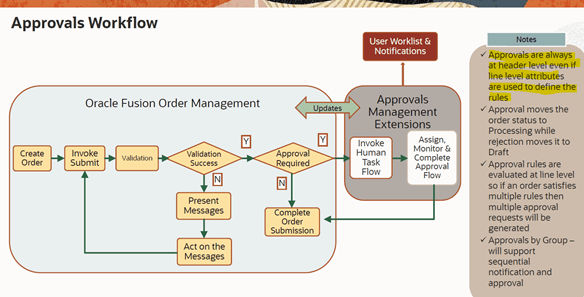

Step1: Enable Order Approval Flow
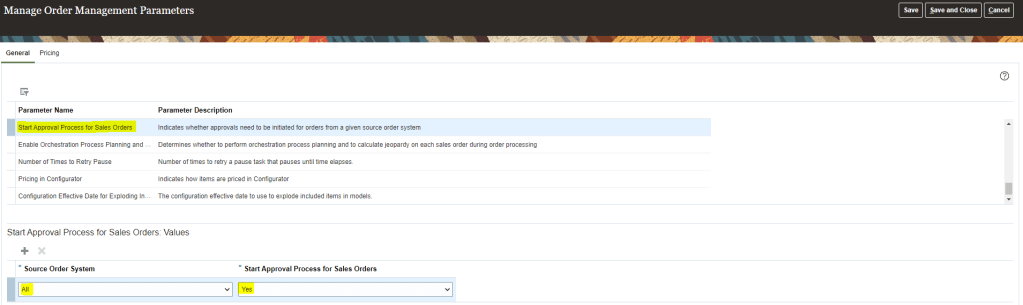
- Navigation :
- Go to Setup and Maintenance. Choose Order Management
- Search for Task “Manager Order Management Parameter”

- Click on “Start approval process for Sales Order”. It Indicates whether approvals need to be initiated for orders from a given source order system.
- Select Source Order System. In Start Approval Process for Sales Orders value should be “YES”.
- In Source Order System we can have one set of system or multiple for which we want to start approval process i.e. we can only limit approval process for all orders coming from Legacy system.
Step2: Designing Order Approval Flow
- Navigation: Go to Others -> Setup and Maintenance -> Order Management -> Enter Task(Manage Order Approval Rules)

- Create Rule If Order Total Amount is Greater than $10,000 and Customer is “ABC Application Software”

- Based on above criteria, click on Then -> Action and assign a approval process. It can be assigned to Single Person or to a Group. See Step 4 if it is assigned to Approval Group.
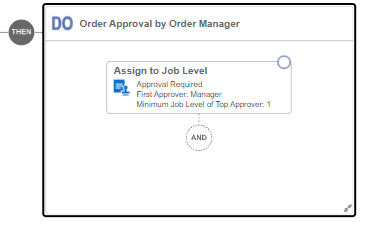
Complete Order Approval Process Condition should look like below

Step3: Click on Activate to activate the rule with Effective Dates(Start and End) .

Step4: Create Approval group using Task (Manage Approval Groups)
In case we setup


 My Cloud Journey