OC Connects applications and automate end-to-end Business process.
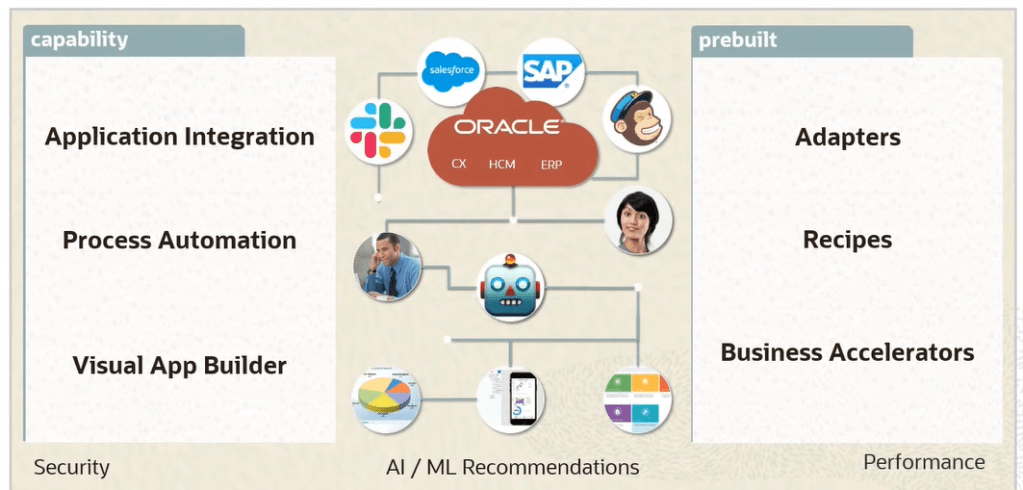
There are Three type of Oracle Integration Cloud Services
- Integrations : Create and Manage Integrations using below steps
- Create the connections to the applications with which we want to share data.
- Setup the Integration using the connection you created.
- Define the flow of data to be shared between connections.
- Process Builder : Automate the business using below Process Applications
- Develop
- Test
- Publish
- Activate
- Visual Builder : Develop Web and Mobile Applications by following below steps.
- Quickly create and publish custom web and mobile applications using Visual Development tool.
- Build the pages in our application using the components that is placed on a canvas and then integrate with other services.
- There is no need for any setup or coding.
OIC : Integrations
- OIC : Oracle Integration Cloud is a complete, secure and lightweight integration solution that enables us to connect our application in the cloud.
- It simplifies connectivity between our applications and connects both our applications that live in the cloud and on premises.
- It provides secure, enterprise-grade connectivity regardless of the applications we are connecting and where they reside.

SaaS-to-SaaS Integration
- Business Case : All cases created in Salesforce are synchronized with Oracle Service Cloud
- It automate real-time Integration
- Streamline Business process by integrating across multiple business systems.

SaaS-to-PaaS Integration
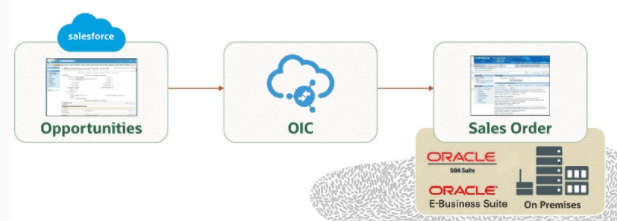
- Business Case : Update of opportunities in Salesforce propagated to on-premises Order Management.
- It shows an opportunity-to-order system that is distributed across E-Business Suite and Salesforce.com.
- It is scenario using hybrid integration, which leverages OIC and SOA Suite on-premises.
OIC Integration Components
- OIC uses adapters to connect to source and target systems and then extract data from the source system, Mediate the semantics and technical differences and publish the data to the target.
- Leverage Oracle Public Cloud Services for storage and Messaging Services.

Workflow for Integration Development and management
- Step 1: First step in Integration design is to identify the applications that we want to integrate and then configure the connection details for these applications.
- Connections are created that are based on prebuilt adapters.
- Step 2: Create Integrations by dragging these connections to the Designer.
- Step 3: Create mapping of Data between applications using Graphic mapper.
- Step 4: Activate the Integration.
- Step 5: Monitor the Integration using monitoring dashboard. We can pinpoint bottlenecks, monitor errors and see details for each running integration.

OIC Connection
It is a resource that represent either a new OIC interface or an existing external application or system. Connection can be used in either of the roles
- Trigger(Inbound)
- Defines a SOAP or REST interface allowing clients to invoke an integration flow.
- Allows for defining an event subscription or SOAP interface for a SaaS application.
- Defines a polling trigger to consume a file or message from an upstream system.
- Invoke(outbound)
- Used to define an external service or system that can be called from an integration.
Steps for Creating Connection
- Select an Adapter.
- Provide Basic Information.
- Name.
- Identifier which is uppercase value of Name entered.
- Role based on Adapter.
- Trigger
- Invoke
- Trigger and Invoke
- Configure Connection Properties based on Adapter chosen.
- Configure Security based on Adapter chosen.
- Test the Connection.
Point to Note
- Generally we only create one connection for each external system or application, which get reused by Integrations. Exception are there based on scenario where we create more connections for each system.
- Multiple runtime connections are managed by OIC for each integration flow as needed.
Connection for Oracle ERP Cloud.

Message Exchange Patterns
We create a business object-based or event-based orchestrated integrations which allows four interaction patterns
- Synchronous Interface which is request-response
- Asynchronous Interface which is one-way
- Asynchronous Interface which is with callback
- Event based or polling

Different types of Role of Adapter
- Trigger Role

- Invoke
- Trigger and Invoke

Response Page


 My Cloud Journey