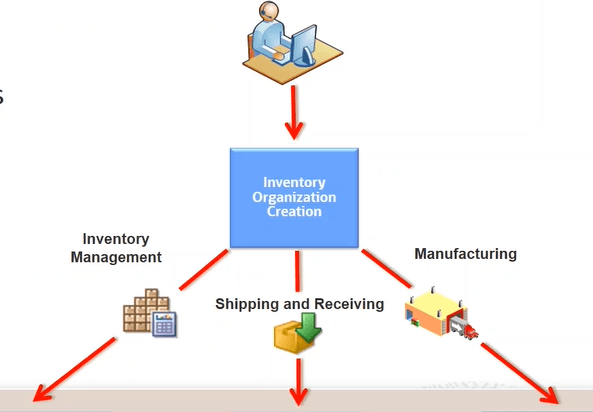
Simplified setups reduces need for users to perform several steps to create a bunch of setups. It will create basic minimal mandatory setups which are required for business to perform. It is generally done when Implementation team needs to quickly setup data and business flows so that it can be tested or sort of to give a headstart.
- It will create the basic setups like
- Subinventories
- Receiving Parameters
- Manufacturing Plant Parameters if Org is meant to be setup as Manufacturing org.
- It will Seed data which will be used in SCM setups.

Benefits of Simplified setups
- It helps in creating multiple task with bare minimal input.
- It reduces implementation time through automated setup.
- All information’s are setup with consistent data across the system.
SCM Simplified common components
- Using quick setups below components gets created
- Calendar
- Unit of Measures
- Master Organization
- One or More Inventory, Manufacturing, or Maintenance Organization
SCM quick setup
- Navigation : Go to Others -> Setup and Maintenance -> Manufacturing and Supply Chain Materials Management
- Select Facilities -> Click on Gear Box

Setup 1 : Calendar Setup
- First screen appears for Calendar.
- We can change the Start date, Weekend, Start and End time and Duration
- Once created it can be viewed by using task ” Manage Schedules”.

Setup 2 : Unit of Measure Setup
- Second setup is of Unit of Measure
- We can choose following Unit of Measure
- Time(Chosen by default)
- Length
- Area(Chosen by default)
- Volume
- Mass
- Count

Setup 3 : Inventory Organization
- Third setup is of Inventory Organization.
- Choose Management Business Unit for which Inventory Organization will be created
- Select “+” button to create new Organization
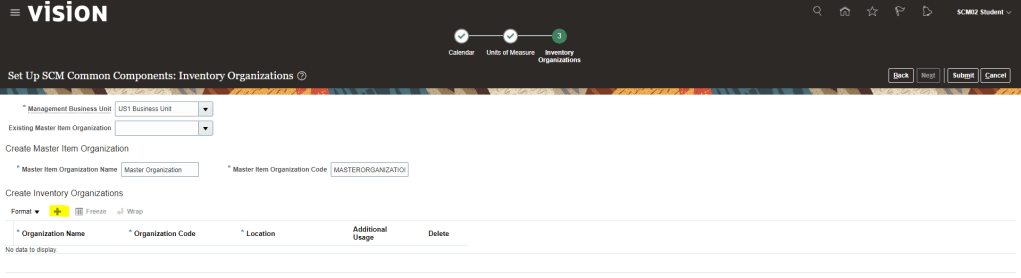
- Enter Organization Name = “RV07”.
- Operation Code gets defaulted by value put in Organization Name.
- Location can be chosen from the list of Location which are part of Master Organization.
- Additional Usage : It determines the purpose of the inventory organization, be it for Manufacturing or Non Manufacturing Purpose.

- On clicking Submit, we will get below message

- Master Item Organization got created.
- Inventory Organization “RV07” got created.
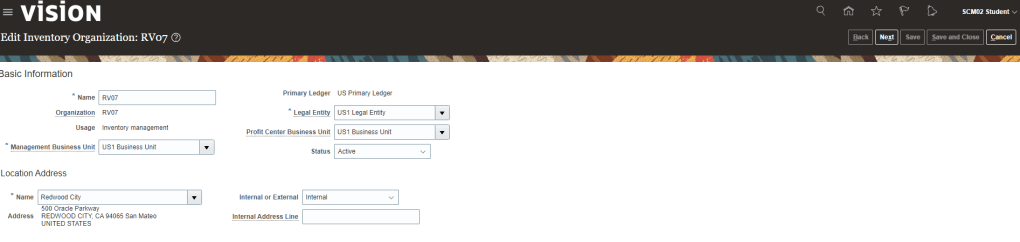
- Calendar “Ravi’s Calendar” got created and can be seen in Schedule Section of Inventory Organization
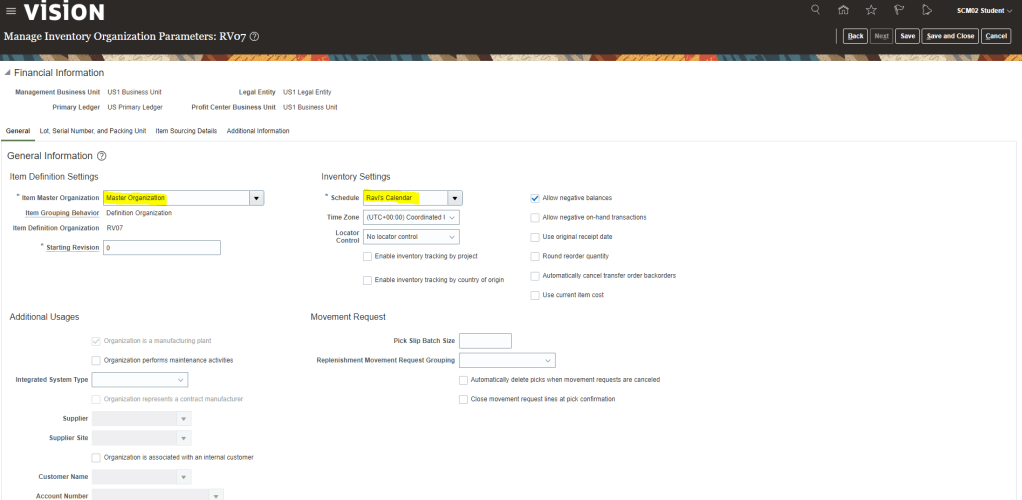
- Calendar details can also be seen using task “Manage Schedules”

- I have got error in Units of measure and have been asked to use task ” Manage Units of Measure” and “Manage UOM Classes” to create it. It is an environment issues as it is a training environment and all these unit of measure already exists.


 My Cloud Journey