Orchestration Process Assignment in Order Management, Oracle Fusion
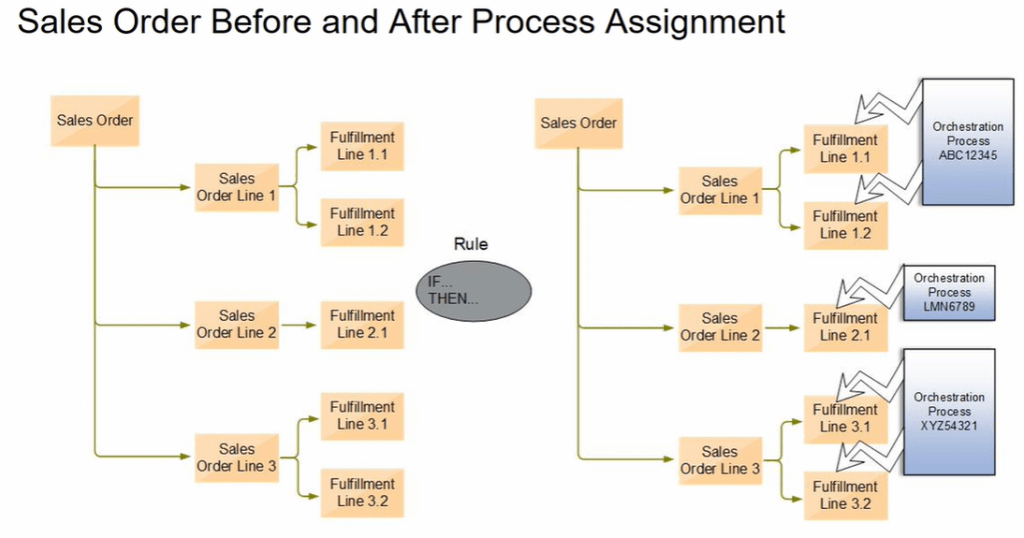
After we submit an order, Orchestration process is assigned automatically to each fulfillment lines of the order.

- Below is the snapshot of Orchestration process getting assigned to each fulfillment lines. It could be possible that one Orchestration process gets assigned to multiple fulfillment lines.
Steps to Assign Orchestration Process
- Navigation: Setup and Maintenance -> Order Management -> Enter Rules(Manage Process Assignment Rules for Sales Order)
- Create a Rule to assign specific shipping Method for specific item
- Create a rule If Item(AssignLaunchRules.Order Fulfill Line) = “AS68004” then assign in Process section Process Name (AssignLaunchRules.Order Fulfill Line) “IS SET TO ” ShipOrderGenericProcess.
- Click Ok and Save and Close.

Orchestration Group
An orchestration group is a collection of fulfillment lines that Order Management, processes
together. Each orchestration group is a subset of a sales order. An assignment rule processes
each orchestration group at run time, so you must add a test that links each fulfillment line with
the group. The predefined assignment rules already include this test.
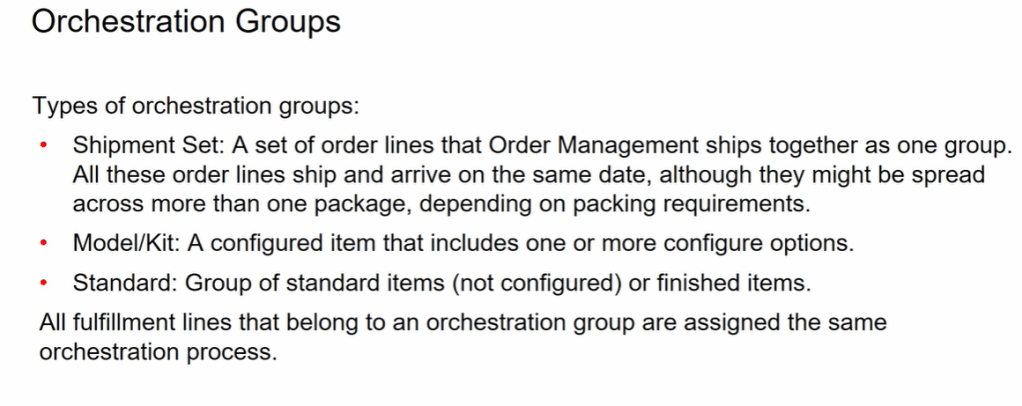
This gives flexibility to group fulfillment lines based on certain criteria which helps in saving cost of the organization.
If we take below example, due to unavailability of stock, Keyboard will not be delivered before Oct 15, but rest of items can be delivered by October 10th and 11th. If there would had been no grouping, all items would have got delivered on their respective scheduled dates, thereby incurring additional shipping cost.
But if Organization has set Grouping based on Shipment Set, despite order lines has different schedule date, they all get grouped and are shipped on October 15th, there by saving shipping cost for the organization.


 My Cloud Journey